Platform architecture
A self-hosted Arcade deployment runs the services below on your Kubernetes cluster. The Helm chart and the Azure and AWS marketplace deployments install the same platform.
This page describes what each service does and what it connects to. For installation steps, see Self-host with Helm.
Reference topology
The diagram below shows a complete deployment: the Kubernetes clusters that run the platform and its workers, the network boundaries each call crosses, and the data tier behind every service. The sections that follow describe each piece.
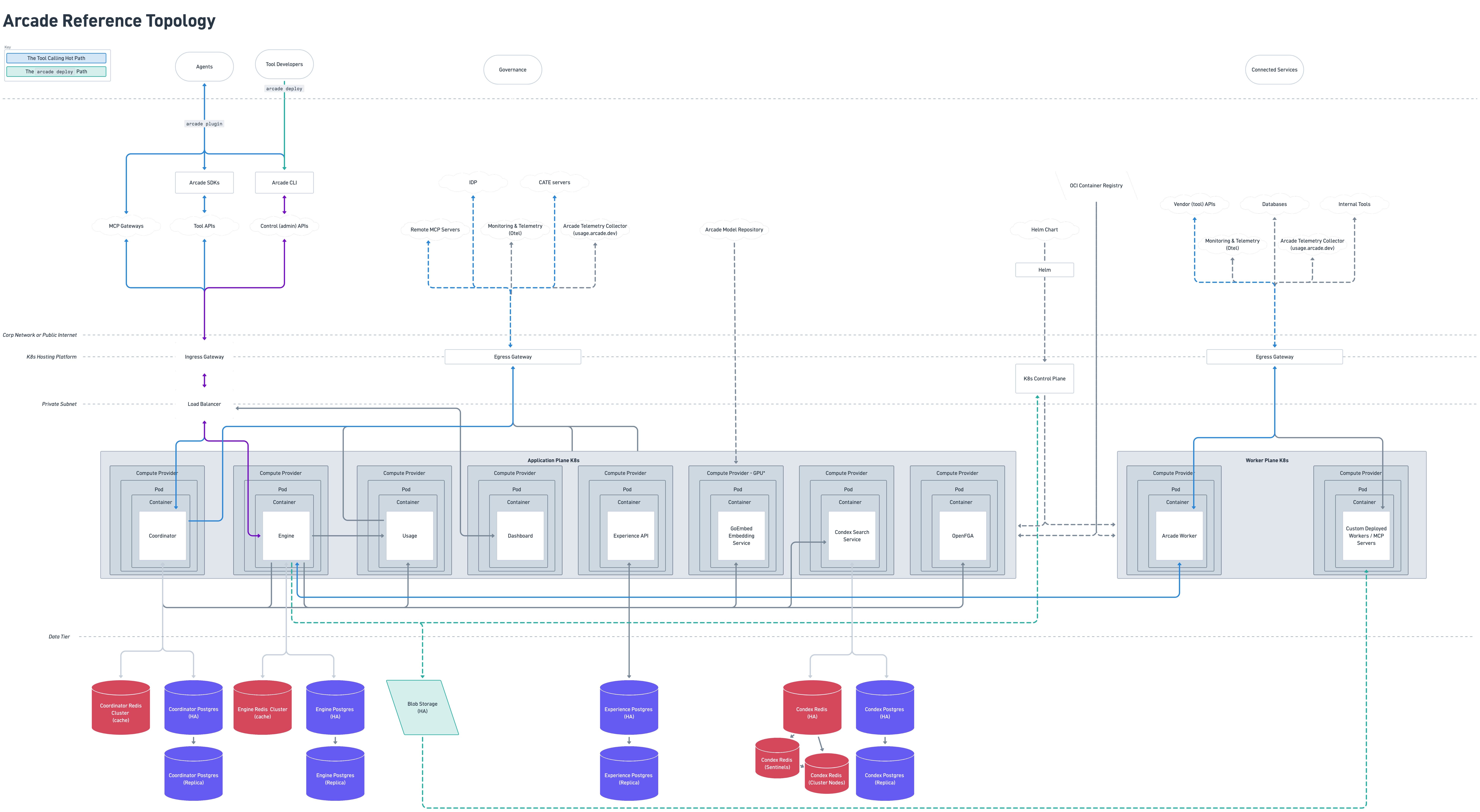
The Arcade reference topology. Open the diagram in a new tab to zoom in and read the labels.
Services
| Service | Responsible for | Talks to | Required |
|---|---|---|---|
| Engine | Tool execution and routing, the token vault, and MCP gateways | Coordinator, MCP servers, OAuth providers, your hooks | Yes |
| Coordinator | Users, organizations, projects, access control, and OAuth callbacks | Your identity provider, OpenFGA | Yes |
| Experience API | Sessions and backend calls for the dashboard | Engine, Coordinator | Yes |
| Dashboard | The web interface for operators and developers | Experience API | Yes |
| MCP servers | Hosting and running tools | The third-party APIs the tools call | Yes |
| OpenFGA | Evaluating operator access control policies | Nothing outbound | No |
| Usage | Collecting usage events for billing and analytics | Billing and analytics sinks | No |
| PostgreSQL and Redis | Persistent state, caching, and sessions | Nothing outbound | Yes |
Agents and call the Engine. Operators use the dashboard in a browser, which reaches the platform through the Experience API. Each service reads and writes its own state in PostgreSQL and Redis.
Engine
The Engine is the API that call. It:
- Serves the catalog, including each tool’s schema
- Executes tool calls, dispatching each one to the server that owns the and returning the result
- Runs the token vault: it takes each end user through the OAuth flow for a provider such as Google or Slack, stores the resulting token encrypted, refreshes it before it expires, and supplies it to the at execution time
- Serves MCP gateways, the scoped endpoints that and MCP clients connect to
- Registers servers and reconciles their catalogs into its database
- Stores auth provider configuration and per- secrets
- Records each , which the dashboard’s execution history and audit logs read from
- Calls contextual access hooks before and after a runs, which can allow, deny, or rate-limit the call
The Engine calls the Coordinator to validate API keys and resolve the account, organization, and project behind a request. It calls servers over HTTP to execute .
Coordinator
The Coordinator owns identity and tenancy records:
- , organizations, projects, , and member invitations
- The connection to your OIDC identity provider, and the User Sources that authenticate the end users of an gateway
- Role assignments, which it evaluates against OpenFGA when you turn on role-based access control
It handles two flows that require a reachable endpoint:
- OAuth callbacks. When an end authorizes a provider such as Google or Slack, the provider redirects back to the Coordinator, which completes the exchange so the Engine can store the credential.
- Authorization for clients. The Coordinator acts as an OAuth authorization server, so an MCP client can sign a in and receive a token scoped to a gateway.
It also validates for the Engine, writes the audit log, and enforces rate limits.
Experience API
The Experience API is the backend for the dashboard. The dashboard does not call the Engine or Coordinator directly. Its requests go through the Experience API, which:
- Signs operators in against your identity provider and manages the browser session
- Forwards the dashboard’s requests to the Engine and the Coordinator, attaching the signed-in ’s access token
- Serves the playground
- Serves the dashboard’s runtime configuration and tracks onboarding progress
Only the dashboard calls it. and applications use the Engine’s API.
Dashboard
The dashboard is the web interface for operators and developers. It covers registering and inspecting servers, browsing the tool catalog and testing individual tools, creating MCP gateways, configuring auth providers and secrets, managing projects, members, roles, and API keys, connecting User Sources, and reading audit logs and history.
It runs in the browser and calls only the Experience API.
MCP servers
An server hosts implementations and runs them on request. A deployment can draw tools from three sources:
- The bundled server. Each deployment includes one, preloaded with Arcade’s integration toolkits for services such as Gmail, Slack, Jira, GitHub, and Notion. See Arcade Worker for how it runs toolkits and the settings you control.
- servers you write and deploy. Each one is a separate deployment, so you can scale or isolate it independently.
- Remote MCP servers. Register an server that Arcade does not host, whether your team runs it or a vendor does, and its join the same catalog. This adds nothing to your cluster.
In each case the Engine sends the tool call over HTTP with the end-user credential from the token vault, and the server returns the result. The catalog, gateways, auth, and audit trail work the same way regardless of where the server runs.
servers appear as workers in the Helm values and in the Engine’s API. The two terms refer to the same thing. Neither is an MCP gateway, which is a feature of the Engine rather than a deployed service.
OpenFGA
OpenFGA evaluates whether an account may perform an action on an organization or project. It backs the Org Admin, Project Admin, and Project Member roles, down to individual permissions such as creating an API key or deleting an gateway.
It is optional and turned off by default. When turned on, the Coordinator is its only caller.
Usage
The Usage service collects usage events from the Engine, Coordinator, and servers and routes them to billing and analytics sinks.
It is off by default. You can turn it on to send usage information back to Arcade, which helps improve the product.
Network paths
Three services accept inbound traffic. The Engine takes calls from agents, Arcade clients, and clients. The Dashboard and Experience API take requests from operators’ browsers. Nothing outside the cluster connects to the Coordinator, an , OpenFGA, or a data store.
The platform initiates the remaining connections outbound:
| From | To | For |
|---|---|---|
| Engine | Coordinator | Validating API keys and resolving accounts, organizations, and projects |
| Engine | MCP servers | Executing tool calls, whether the server runs in your cluster or elsewhere |
| Engine | OAuth provider token endpoints | Getting and refreshing end-user tokens. Restrict with engine.ssrfAllowlist. |
| Engine | Your contextual access hooks | Policy checks before and after each tool call |
| Coordinator | Your OIDC identity provider | Signing operators in |
| MCP servers | Third-party APIs | The work each tool does |
| Engine, Coordinator, MCP servers | Arcade’s usage endpoint | Usage information, if you turn it on |
The Engine accepts no connection from the Coordinator, so it can run behind a firewall as long as it can reach the destinations in the preceding table.
The OAuth callback
When an end authorizes a provider such as Google or Slack, the provider redirects the user’s browser to a callback URL on the Coordinator. The provider does not call the deployment directly. The only provider-facing request is the code-for-token exchange, which Arcade makes outbound.
The Coordinator’s callback URL therefore has to be reachable from wherever your ’ browsers are, not from the public internet. If your users are on a corporate network or VPN, the Coordinator can stay private to that network.
Data stores
PostgreSQL stores persistent state:
- , organizations, , and
- Registered servers and their definitions
- gateway configuration
- Encrypted end-user tokens and secrets
- history and audit logs
Redis stores state that can be rebuilt: validated API keys, the tool registry, and gateway session state, in-flight OAuth requests, permission decisions, and rate-limit counters.
The Helm chart can deploy PostgreSQL and Redis alongside the platform for evaluation. These bundled instances have no backups and no high availability. Use your own managed PostgreSQL and Redis instances in production.
Next steps
- Self-host with Helm to install the platform
- Create an MCP gateway to scope and auth for each client
- Set up a User Source to authenticate your end